
Feishu / Lark
Feishu/Lark is an all-in-one collaboration platform where teams chat, share documents, manage calendars, and get work done together. Status: production-ready for bot DMs + group chats. WebSocket is the default mode; webhook mode is optional.Quick start
Requires FluffBuzz 2026.4.23 or above. Runfluffbuzz --versionto check. Upgrade withfluffbuzz update.
1
Run the channel setup wizard
2
After setup completes, restart the gateway to apply the changes
Access control
Direct messages
ConfiguredmPolicy to control who can DM the bot:
"pairing"— unknown users receive a pairing code; approve via CLI"allowlist"— only users listed inallowFromcan chat (default: bot owner only)"open"— allow all users"disabled"— disable all DMs
Group chats
Group policy (channels.feishu.groupPolicy):
Default:
allowlist
Mention requirement (channels.feishu.requireMention):
true— require @mention (default)false— respond without @mention- Per-group override:
channels.feishu.groups.<chat_id>.requireMention
Group configuration examples
Allow all groups, no @mention required
Allow all groups, still require @mention
Allow specific groups only
Restrict senders within a group
Get group/user IDs
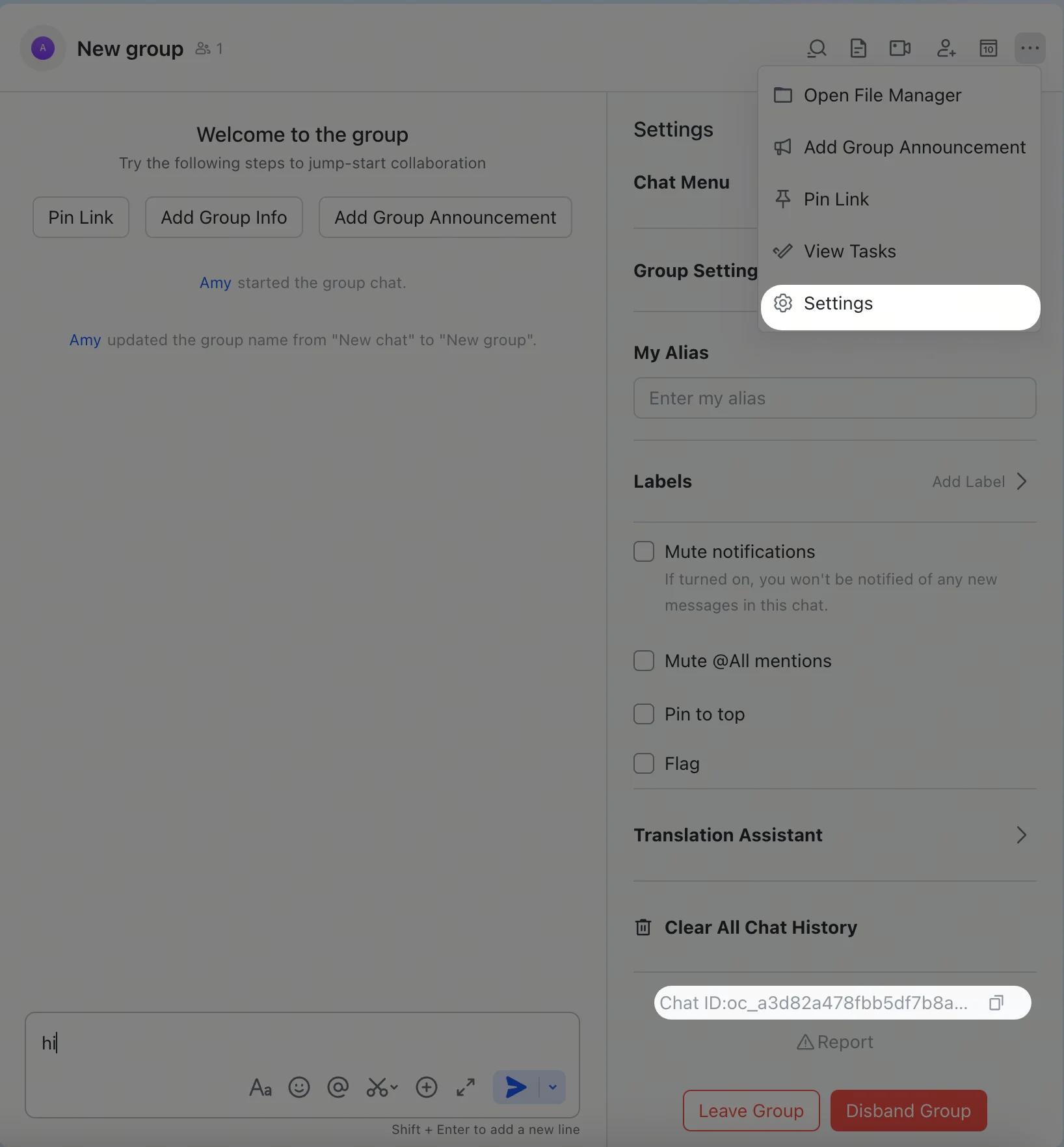
Group IDs (chat_id, format: oc_xxx)
Open the group in Feishu/Lark, click the menu icon in the top-right corner, and go to Settings. The group ID (chat_id) is listed on the settings page.
User IDs (open_id, format: ou_xxx)
Start the gateway, send a DM to the bot, then check the logs:
open_id in the log output. You can also check pending pairing requests:
Common commands
Feishu/Lark does not support native slash-command menus, so send these as plain text messages.
Troubleshooting
Bot does not respond in group chats
- Ensure the bot is added to the group
- Ensure you @mention the bot (required by default)
- Verify
groupPolicyis not"disabled" - Check logs:
fluffbuzz logs --follow
Bot does not receive messages
- Ensure the bot is published and approved in Feishu Open Platform / Lark Developer
- Ensure event subscription includes
im.message.receive_v1 - Ensure persistent connection (WebSocket) is selected
- Ensure all required permission scopes are granted
- Ensure the gateway is running:
fluffbuzz gateway status - Check logs:
fluffbuzz logs --follow
App Secret leaked
- Reset the App Secret in Feishu Open Platform / Lark Developer
- Update the value in your config
- Restart the gateway:
fluffbuzz gateway restart
Advanced configuration
Multiple accounts
defaultAccount controls which account is used when outbound APIs do not specify an accountId.
Message limits
textChunkLimit— outbound text chunk size (default:2000chars)mediaMaxMb— media upload/download limit (default:30MB)
Streaming
Feishu/Lark supports streaming replies via interactive cards. When enabled, the bot updates the card in real time as it generates text.streaming: false to send the complete reply in one message.
Quota optimization
Reduce the number of Feishu/Lark API calls with two optional flags:typingIndicator(defaulttrue): setfalseto skip typing reaction callsresolveSenderNames(defaulttrue): setfalseto skip sender profile lookups
ACP sessions
Feishu/Lark supports ACP for DMs and group thread messages. Feishu/Lark ACP is text-command driven — there are no native slash-command menus, so use/acp ... messages directly in the conversation.
Persistent ACP binding
Spawn ACP from chat
In a Feishu/Lark DM or thread:--thread here works for DMs and Feishu/Lark thread messages. Follow-up messages in the bound conversation route directly to that ACP session.
Multi-agent routing
Usebindings to route Feishu/Lark DMs or groups to different agents.
match.channel:"feishu"match.peer.kind:"direct"(DM) or"group"(group chat)match.peer.id: user Open ID (ou_xxx) or group ID (oc_xxx)
Configuration reference
Full configuration: Gateway configurationSupported message types
Receive
- ✅ Text
- ✅ Rich text (post)
- ✅ Images
- ✅ Files
- ✅ Audio
- ✅ Video/media
- ✅ Stickers
Send
- ✅ Text
- ✅ Images
- ✅ Files
- ✅ Audio
- ✅ Video/media
- ✅ Interactive cards (including streaming updates)
- ⚠️ Rich text (post-style formatting; doesn’t support full Feishu/Lark authoring capabilities)
Threads and replies
- ✅ Inline replies
- ✅ Thread replies
- ✅ Media replies stay thread-aware when replying to a thread message
Related
- Channels Overview — all supported channels
- Pairing — DM authentication and pairing flow
- Groups — group chat behavior and mention gating
- Channel Routing — session routing for messages
- Security — access model and hardening